How To…
How to Use a Buddy Pass
Must Book Online
Buddy Passes not booked online will cost the member or Buddy $15 to attend class.
Buddy Passes are not eligible to be used for Zoom classes, only in person classes.
On Website:
Login to Mindbody here.
At the top of the page, choose the location your Buddy is going to (you may need to re-adjust the drop-down menus to get to the right place).
Find the class they are attending and click Sign Up Now.
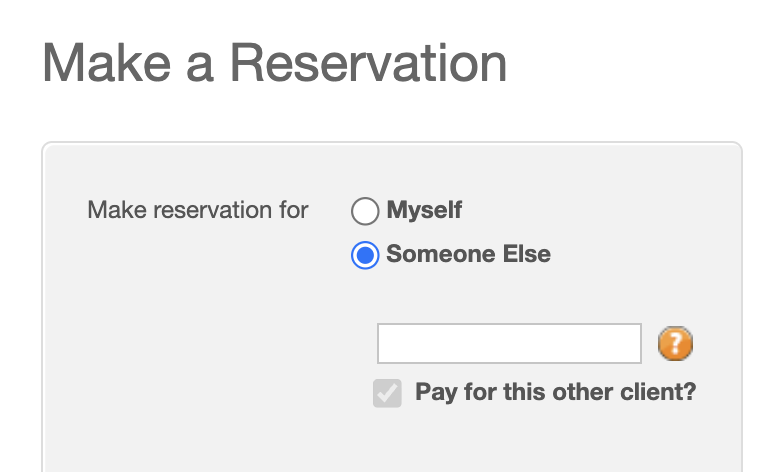
Click Make a Reservation for: Someone Else.
Type in your friend’s name or email address.
After that, go back and book the class for yourself.
On Ahimsa’s App:
Login to the Ahimsa Yoga Studio App.
Find the class you want to take and click Book.
Click + Book a Guest.
Add your buddy’s name and select Confirm Booking.
Click Selected Pricing Option and choose Buddy Pass. If there is no Buddy Pass showing, you either do not receive Buddy Passes or you already used yours for the month.
How to Buy a $15 Guest Pass (Members Only)
Details
Monthly Members have the option to buy $15 Guest Passes.
Please book Guests online prior to class.
While at the studio, we can use your card on file to pay for your Buddy, or your Buddy can buy the Guest Pass at the front desk on their own.
This is meant for bringing friends to class with you - you cannot buy a buddy a “package” of guest passes. Members found abusing the policy will be contacted.
Not valid for Zoom classes.
On Website:
Login to Mindbody here.
At the top of the page, choose the location your Buddy is going to (you may need to re-adjust the drop-down menus to get to the right place).
Find the class they are attending and click Sign Up Now.
Click Make a Reservation for: Someone Else.
Type in your friend’s name or email address.
On the next page, scroll down to choose Guest Pass $15 and checkout.

How to Cancel a Class
On Our Website:
Login to your Account.
Click My Schedule.
Click Cancel.
On our Ahimsa App:
Make sure you are logged in.
Click Profile.
Click Schedule.
Click Cancel.
How to Book an Event for a Friend
On Our Website:
Login to Mindbody here.
At the top of the page, choose the location your friend is going to (you may need to re-adjust the drop-down menus to get to the right place).
Find the event they are attending and click Sign Up Now.
Click Make a Reservation for: Someone Else.
Type in your friend’s name or email address.
On the next page, scroll down to the correct pricing option and checkout.
On Ahimsa’s App:
Login to the Ahimsa Yoga Studio App.
Find the class you want to take and click Book.
Click + Book a Guest.
Add your buddy’s name and select Confirm Booking.
Click Selected Pricing Option and choose event’s pricing option and checkout.
How to Cancel or Suspend Your Membership
Reminders
Memberships can be canceled anytime with 30 days notice.
We do not offer refunds on memberships.
We require 2 months minimum commitment for all memberships.
You can suspend your membership for free two times per year for 2 weeks minimum and 2 months maximum. After that, suspensions are $20 each.
How to Cancel or Suspend:
Fill out the form on our website here: www.ahimsayogastudios.com/cancel
How to Use Account Credit or Gift Card
Must be done on a website
Login directly to mindbody.
Find the class or event you want to book and click Enroll.
Click Checkout.
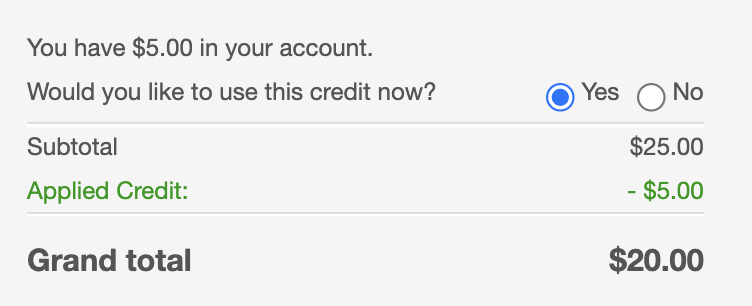
Account Credit - A box will pop up asking if you would like to use your account credit. Choose Yes.
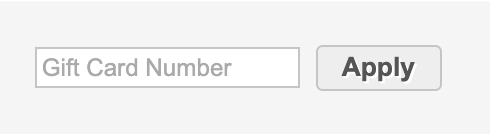
Gift Card - A box will ask you to enter the gift card number and click Apply.
Complete the remaining balance with your credit card.